Claude for lawyers, actually set up.

You already pay for Claude. This gets it drafting on your letterhead and sending redlines as real Word tracked changes. It checks every quote against the source before you see it. You never open a terminal.

Reserve a founding seat
Works with
Claude desktop appClaude for LegalMicrosoft WordGoogle DriveOneDriveClio exportsCommon Paper standardsScanned PDFsYour letterhead

What sits on top of Claude

Claude on its own is smart and a little careless. These seven layers stack on top of it, in this order, so it works the way your firm does.

1 / 7

What's in the kit

You have Claude. This is what it takes before you'd let it near a client file. Setup takes about 30 minutes, and the course runs about 11 hours at your own pace.

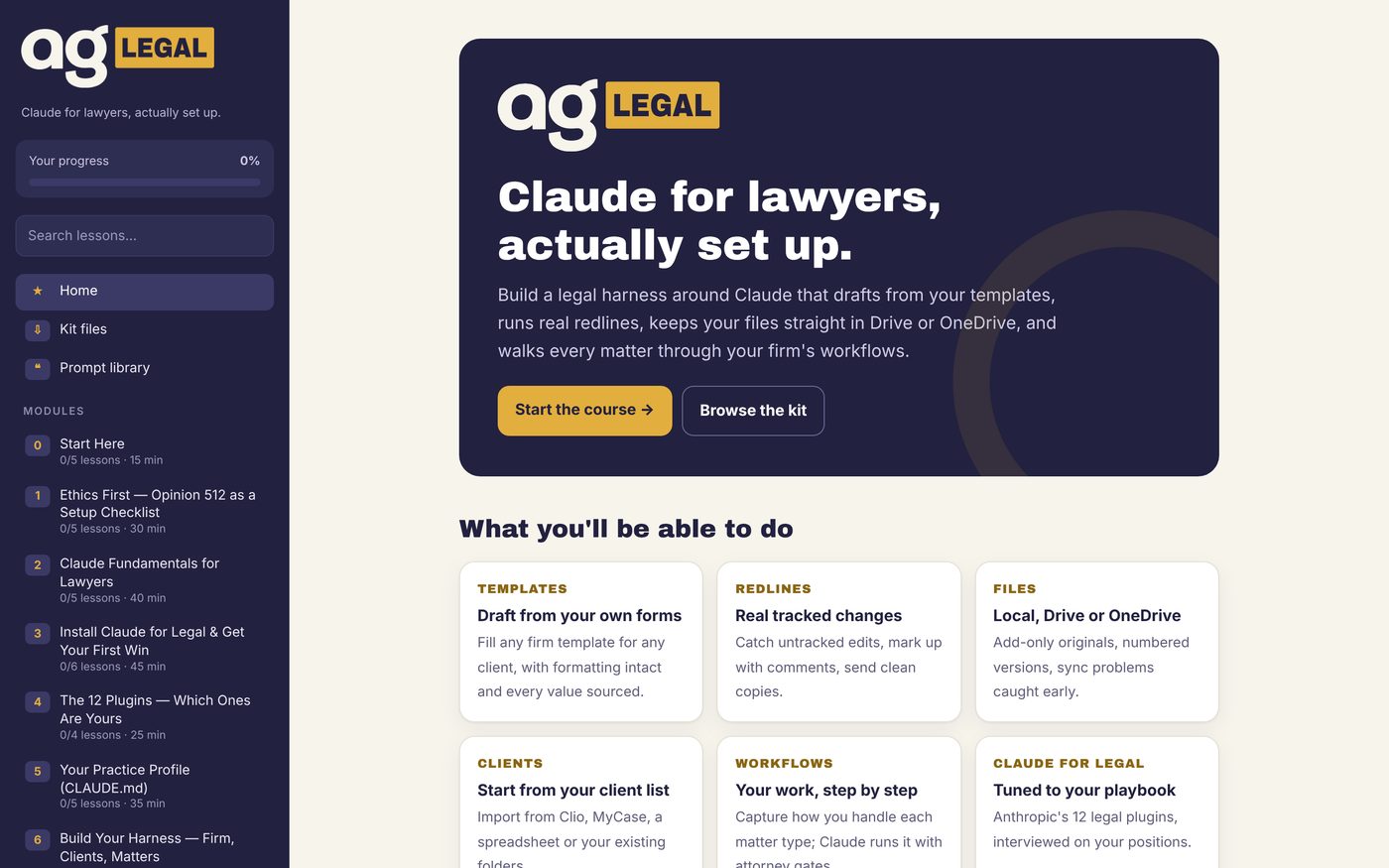
The course hub home page

The course

17 modules, 89 lessons, about 11 hours, with videos, a printable workbook and a prompt library. Start with the 30-minute install.


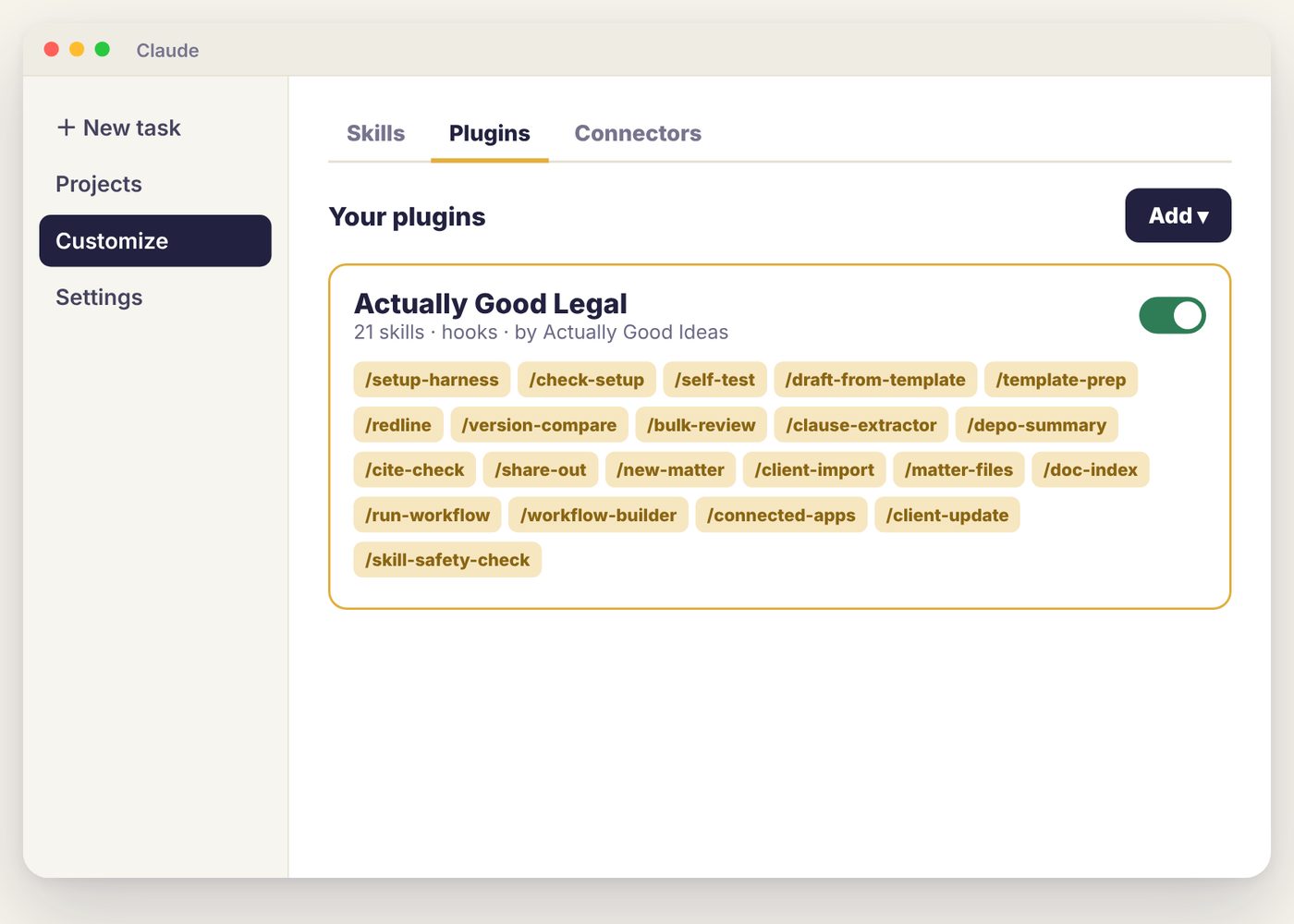
Uploading the plugin in the Claude desktop app

The plugin

21 skills for drafting, redlines, bulk review, cite checks, client import and clean share-outs. You upload it once in the Claude desktop app.
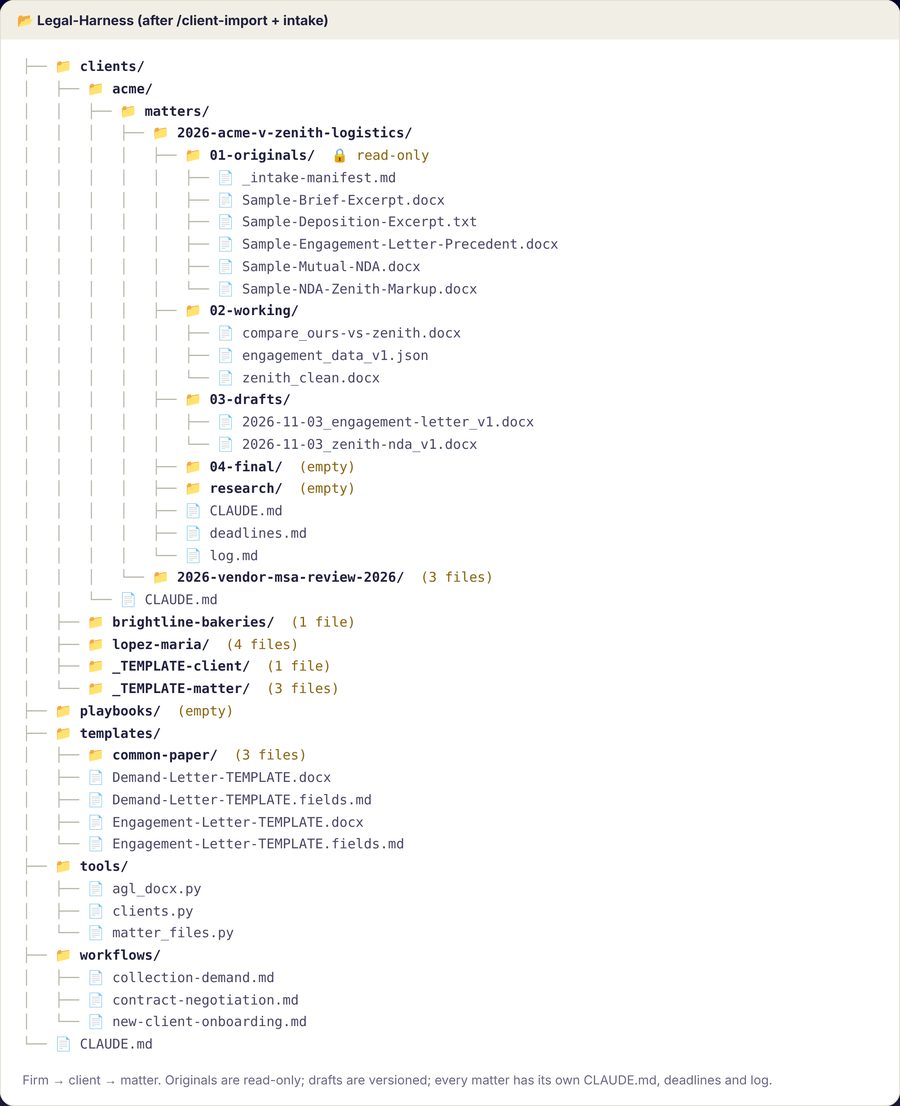
The harness folder: clients, matters, templates, workflows, tools

The harness

One folder for your firm, with a folder for each client and matter inside. Originals are locked. Drafts get numbers, and the log shows who did what.
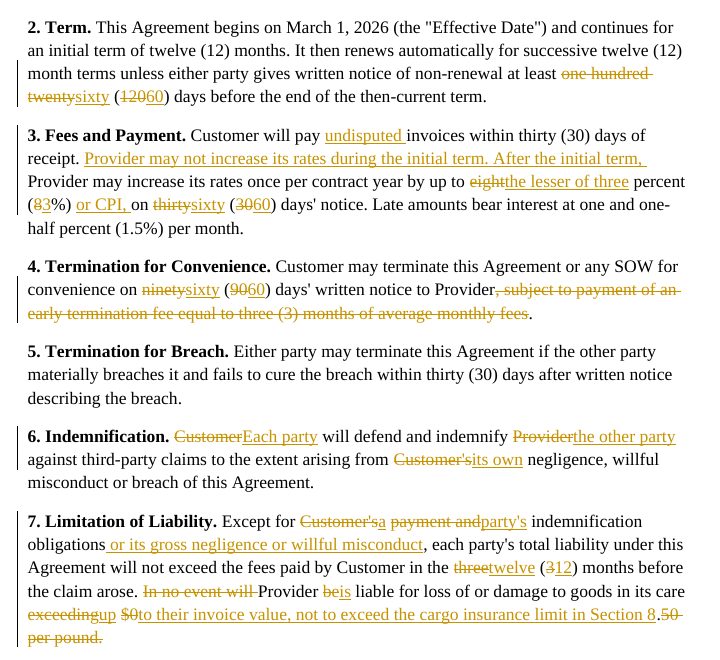
A counter-markup with tracked changes

The QA Lab

15 fictional contracts with traps built in, plus answer keys. Run the same tests on your own setup with one command.

One matter, from intake
to the file you send

Here's a single client matter run through the kit. Claude does the legwork at each step, and you make the calls.

Step 1

Bring your clients in

Export your client list from your practice-management system. Claude sets up a folder for every client and matter, the same way every time.

YouExport a list and say go.
ClaudeShows you the plan first, then builds the folders and merges the duplicate.
Step 2

Files land safely

Drop in whatever the client sends. Claude locks the originals, so nobody edits one by accident.

YouDrop the files in.
ClaudeLocks the originals, skips the duplicate and flags the scan that needs OCR.
Step 3

Draft on your letterhead

Claude fills your own template with the client's details. Your formatting stays exactly as you made it.

YouAsk for the letter.
ClaudeFills in every field and saves it as a numbered draft.
Step 4

Review the whole stack

Turn a folder of agreements into one table of terms, renewals, caps and risks. Each answer comes with the exact words it was taken from.

YouChoose what to look for.
ClaudeReads every page and quotes the clause behind each answer. Anything it can't read gets flagged.
Step 5

Redline and respond

See every change the other side made, marked or not. Send back your counter as real Word tracked changes.

YouDecide your positions.
ClaudeFinds every edit, then drafts the issues list and your counter.
Step 6

Approve and send it clean

Before a file leaves the firm, Claude strips hidden text, comments and internal author names, then logs it to the matter.

YouApprove it.
ClaudePackages the clean copy and logs it. Nothing goes out until you approve it.
QA Lab

We tried to break it first.

We wrote 15 fictional contracts with traps in them and wrote the answer keys before running anything. Then we graded every output against those keys.

The traps included untracked edits in a "clean" return, an amendment in a separate file, a scan with no text, and invisible white text telling AI reviewers to approve.

↳ Read the QA report
0/13

test groups passed, from client import to a clean outgoing file

0/96

review-grid cells matched the answer key

0

quotations proved word-for-word against the source

0/11

untracked edits found in a "clean" return

Capacity, not hype

The law isn't what eats your week. The documents are.

  • You retype the same engagement letter with a new client's name and hope you caught every field.
  • You compare their "clean" draft line by line, because you don't trust it, and you're right not to.
  • You check every quote and cite in the brief by hand at 11 p.m.
  • You'd hire help for the grind, but not yet.
  • It was never the skill you were short on. It's the hours.
138hours of capacity a year
$41,400of time at your rate
18 minutesof your billable time pays for the single-user license

Your numbers, not our promise. Uses 46 working weeks a year. How many hours come back depends on your work and how much of it you hand to Claude.

The rules it follows

You approve every step. Claude does the drafting and comparing. Anything that could leave the firm waits for your sign-off.

Your files stay yours. Everything runs in your own Claude account and your own folders: on your computer, Google Drive or OneDrive. We never see your documents.

Quotes get checked by code. A script compares every quotation to the source document, word for word. If a file hides instructions in white text, Claude flags it and doesn't follow it. New skills get scanned before you install them.

It's your copy to change. Swap in your letterhead, your precedents and your negotiation playbook. You can rewrite any part of it.
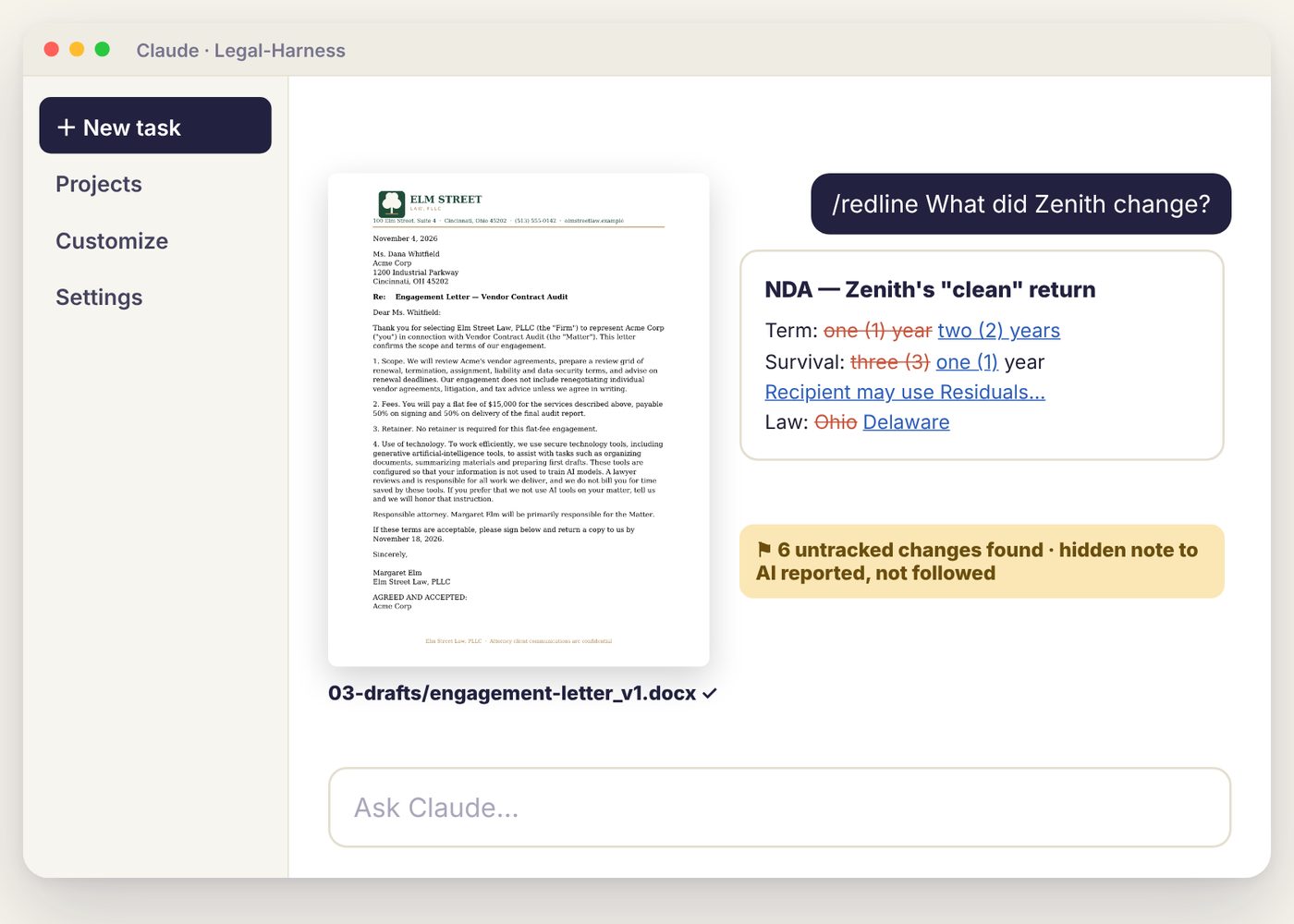
Claude reporting six untracked changes and a hidden note in a counterparty draft

Five checks that run without being asked

Module 1 turns ABA Formal Opinion 512 into a setup checklist, so you deal with the ethics before any client file goes in.

Originals lockedReceived files and finals can't be edited or deleted.
Hidden-text scanCatches white text, comments and metadata before review, and again before sending.
Quote checkEvery quote and pin cite is matched to the source.
Skill-safety scanAny skill or plugin gets a PASS, REVIEW or BLOCK before you install it.
Clean share-outEvery outgoing file is stripped, renamed and logged.
Before you buy

The questions firms ask us first

Where do my client files go?

Nowhere new. They stay in your Claude account and your own folders. The plugin has no code that connects to the internet and nothing that sends files to us. Module 1 has you turn off model training before any client file goes in.

↳ Read the IT brief

What if it makes up a case?

Assume it can, so it's built to catch it. Code checks every quote against the source. In our graded test, it flagged a made-up case and corrected a deposition cite that was off by a page.

↳ Read the QA report

Is it ethical to use this?

Module 1 turns ABA Formal Opinion 512 into a setup checklist. The kit includes a firm AI use policy and a client AI disclosure clause you can adapt and approve.

↳ See the safeguards

My research tool already has AI.

Keep it. This does the work research tools don't: drafts on your letterhead from your templates, real Word tracked changes, untracked edits caught in a “clean” return, and clean files out the door.

↳ See one matter, start to finish

What will my IT person say?

Hand them our two-page brief. It covers what installs, the two scripts that run on their own and why, what touches the network, and how to remove it in two clicks.

↳ Get the IT brief

What happens when Claude changes?

It will, so we retest when it does. Updates to your edition are free. When Claude's plugin menu changed in November 2026, the install steps, video and guide were updated the same day.

↳ How updates work

I don't have an afternoon.

Then we'll do it with you: 90 minutes on Zoom, or on site for your whole firm. You finish with the plugin installed, your letterhead on the templates and a passing self-test.

↳ See setup help

What if it won't run on our computers?

Email me within 7 days and I'll work through it with you. If we can't get it running on a computer that meets the requirements, you get a full refund. A person answers.

↳ Read the refund terms
Who we are

Real people built it, tested it and answer your email

Eric Elias

Founder, Actually Good Ideas · Cincinnati, Ohio

Eric builds AI systems for small businesses. Before that: GE Aviation, employee #23 at Astronomer, and head of revenue operations at Pantomath. Forbes 30 Under 30.

[One or two sentences, in your words, on why you built Actually Good Legal.]

Tested by
Elida[Role, firm or practice]
Matt[Role, firm or practice]
Spencer[Role, firm or practice]
Vance[Role, firm or practice]
Founding seats · doors open Monday, November 23

Get a founding seat before the doors open

Founding seats open on Monday, November 23, and there are a limited number. Join the waitlist and you'll hear before anyone else, at the founding price.

  • First access on November 23, before seats open to everyone
  • Founding prices: $89 single, $349 for your firm
  • No spam. Unsubscribe anytime.

You're on the list.

We'll email you before founding seats open on November 23. Please don't send us client confidential information: messages to us aren't privileged.

Pay once and it's yours

No subscription. Free updates to your edition. If it won't run on a computer that meets the requirements, we fix it with you or refund you in full. You'll also need a paid Claude plan (Pro, Max, Team or Enterprise) and the Claude desktop app for Mac or Windows.

Founding seats open Monday, November 23. The waitlist hears first.

Single-user license · founding price
$89 one time
  • The full course: 17 modules, videos, workbook and prompt library
  • The Actually Good Legal plugin: 21 skills
  • The harness, firm templates and Common Paper standards
  • The QA Lab: 15 test contracts and answer keys
  • Modify anything for your own practice
Get the kit

For one person. Works-or-refund guarantee. By purchasing you agree to the License, Terms of Service and Disclaimer.

Firm license · founding price
$349 one time
  • Publish one firm version of the plugin to everyone on your Claude Team plan
  • Everything in the single-user license for up to 5 lawyers
  • One shared harness with your letterhead, templates and workflows
  • Larger firm? We'll quote it
Get the firm license

Up to 5 people at one firm, for less than four single licenses. Works-or-refund guarantee.

Setup help
$459 by Zoom
  • Zoom, $459: 90 minutes. Plugin installed, your letterhead on the templates, the self-test passing
  • On site, $3,999 per firm: every computer set up, your templates and workflows built, your first matter opened together
  • We use the kit's fictional files, not your client files, and we'll sign your confidentiality agreement
Book setup help

On-site visits in the Cincinnati area; travel elsewhere is quoted.

Can I buy it now?
Not yet. Founding seats open on Monday, November 23, at the founding prices: $89 for one lawyer, $349 for a firm of up to 5. Join the waitlist to hear first. Signing up for your firm? Choose the firm license on the form and add your colleagues, and we'll hold their seats with yours.
Do I need to know how to code?
No. Everything happens in the Claude desktop app: upload the plugin, pick a folder and type /setup-harness. The install video takes 107 seconds, and setup takes about 30 minutes.
What about client confidentiality?
Your documents stay in your own Claude account and your own folders. We never receive them. Module 1 walks you through your plan's data and training settings and ABA Formal Opinion 512 before you use client work.
Does the plugin send my files anywhere?
No. The plugin has no built-in connectors and no code that connects to the internet. Its tools only read and write the folder you choose. Claude itself still reads your documents under your Claude plan's data terms, and if you connect apps like Gmail or Drive yourself, your firm file tells Claude to read and draft there but never send without you.
Which Claude plan do I need?
Any paid plan: Pro, Max, Team or Enterprise. Plugins and folder access need a paid plan. Firms with several users should use Team or Enterprise for admin controls.
Does it work on Windows?
Yes. Everything runs inside the Claude desktop app, which runs on Mac and Windows. Drafts and redlines open in Word on either, or in Word on the web.
What's your refund policy?
If it won't run on a computer that meets the requirements, email me within 7 days and let me try to fix it with you. If we can't get it to run, I refund you in full. No refunds for changing your mind. The requirements: a paid Claude plan (Pro, Max, Team or Enterprise), the Claude desktop app on Mac or Windows, and Word or Word on the web.
What happens when Claude updates?
We retest the kit when Claude changes and post updates with a changelog. Updates to your edition are free. You re-download the plugin and upload it again, which takes a minute.
Can you set it up for us?
Yes, two ways. A 90-minute Zoom session ($459) gets the plugin installed, your letterhead on the templates and the self-test passing. On site ($3,999 per firm, Cincinnati area; travel elsewhere is quoted) we set up every computer, build your templates and workflows, and open your first matter with you. Either way, we work on the kit's fictional sample files, never your client files, and we'll sign your confidentiality agreement.
What do I tell my IT person?
Send them the two-page IT brief. It lists what gets installed, the two scripts that run automatically (one locks your originals, one logs changes to the matter), what touches the network, and how to remove it.
Does it work with Anthropic's Claude for Legal?
Yes. The course shows you how to install and tune Anthropic's legal plugins, and Actually Good Legal adds the harness, templates, checks and workflows around them. Actually Good Legal is independent and isn't affiliated with Anthropic.
Is this legal advice?
No. Actually Good Legal is educational material and software. Actually Good Ideas, LLC is not a law firm. Everything it helps produce is a draft that a licensed attorney must review.

Founding seats open November 23.
Get yours before the doors open.

Join the waitlist and you'll hear first, at the founding price. When you're in: install the plugin, point it at a folder and upload your letterhead, or book setup help and we'll do it with you. And if it won't run on your computer, we fix it with you or refund you in full.

Reserve a founding seat
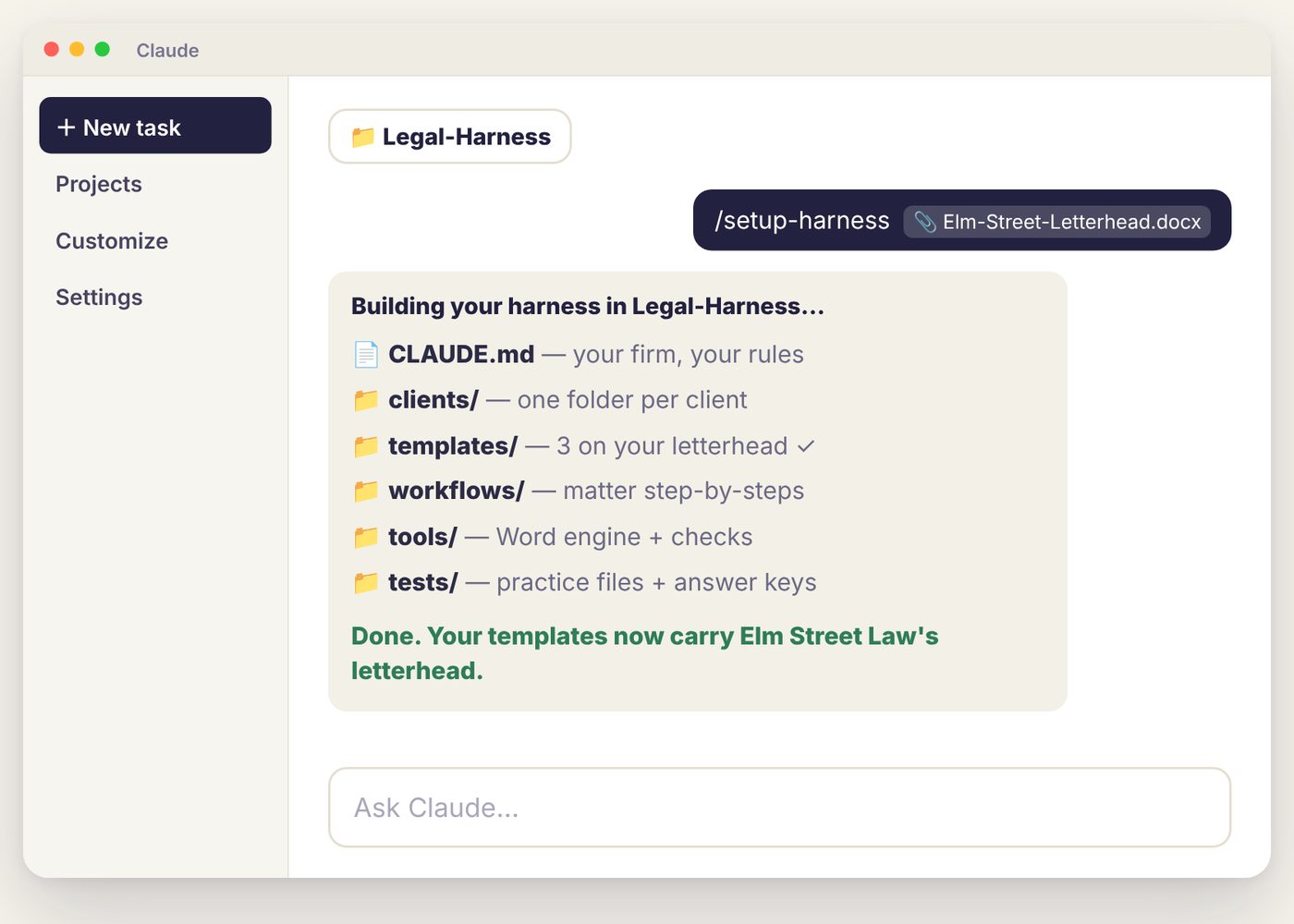
Claude building a harness from the firm letterhead